Evaluating the Steel Logo Mockup 3D Sign Façade for Professional Brand Presentation
In the competitive landscape of brand identity, visual representation is not merely an aesthetic choice but a critical component of market positioning. When designers and business owners seek to present a logo on a physical structure, the difference between a flat digital file and a photorealistic three-dimensional rendering can determine the success of a pitch or the clarity of a design intent. The Steel Logo Mockup 3D Sign Façade has emerged as a specialized resource in this domain, offering a bridge between abstract graphic design and tangible architectural application. This analysis explores the utility, technical specifications, and comparative advantages of this specific mockup tool, helping professionals decide if it aligns with their workflow requirements.
Understanding the Core Concept: What Is This Mockup?
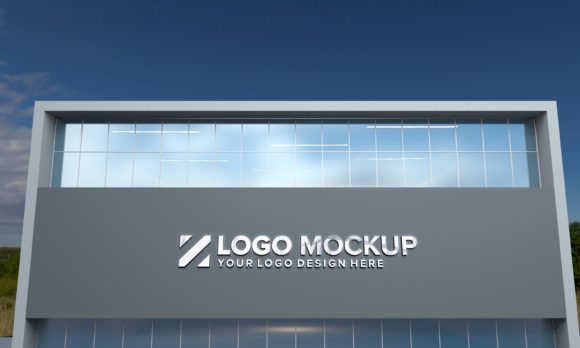
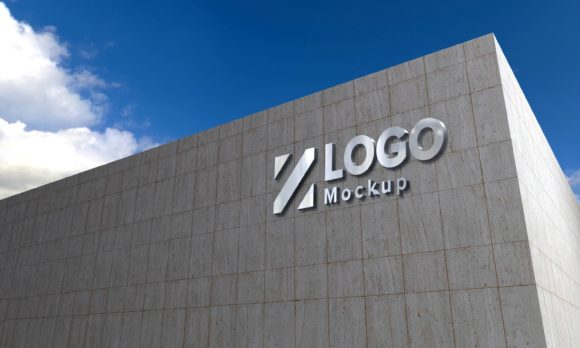
A steel logo mockup serves as a digital template that allows users to superimpose their two-dimensional logo designs onto a realistic three-dimensional surface. Specifically, the Steel Logo Mockup 3D Sign Façade focuses on exterior building applications, simulating how a brand mark would appear when mounted on the side of a modern commercial structure. Unlike generic background templates, this tool is engineered to replicate the optical properties of steel—such as reflectivity, texture, and depth—against the backdrop of contemporary architecture.
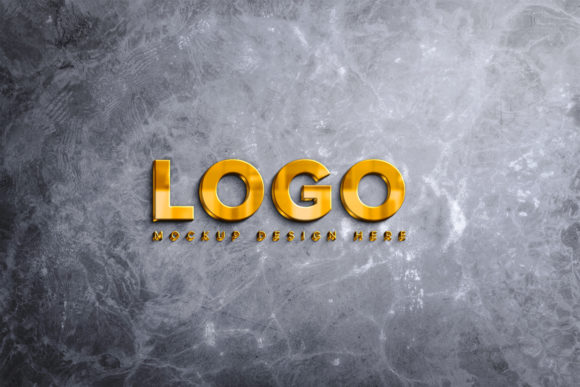
The distinctiveness of this asset lies in its ability to simulate various material finishes. Whether a brand requires a brushed silver finish, a polished gold effect, or a heavy embossed look, the mockup provides the framework to visualize these variations without the need for complex 3D modeling software. For stakeholders who are not familiar with architectural visualization, seeing a logo rendered in high-fidelity steel against a glass-and-steel building facade provides immediate context regarding scale, lighting, and environmental integration.
Technical Specifications and Workflow Efficiency
For graphic designers and creative directors, the efficiency of a tool is often as important as its visual output. The Steel Logo Mockup 3D Sign Façade is built on Adobe Photoshop technology, specifically utilizing Smart Objects to streamline the insertion process. This feature is crucial for professionals managing multiple branding projects, as it eliminates the need to manually mask, warp, or adjust perspective for each new logo placement.
The technical foundation of this mockup includes several key features that support professional workflows:
- V-Ray Rendering Quality: The base image is rendered using V-Ray, a industry-standard rendering engine known for producing physically accurate lighting and shadows. This ensures that the reflections on the steel surface react realistically to the simulated environment, rather than appearing as a simple overlay.
- Smart Object Integration: By working via Smart Object layers, users can replace the default placeholder image with their own design in seconds. The mockup automatically adjusts the perspective and blending modes to match the underlying geometry.
- Resolution and Clarity: With dimensions of 5000 x 3000 pixels at 72 DPI, the file offers sufficient resolution for high-quality web display and large-format printing. This size allows clients to zoom in on details without pixelation, which is essential for evaluating fine typography and intricate logo marks.
- Organized Layer Structure: The PSD file is fully layered and organized into named folders. This transparency allows advanced users to tweak individual elements, such as adjusting the ambient light or modifying the shadow intensity, providing a level of customization that pre-rendered JPEGs cannot offer.
Comparative Analysis: Steel Façade vs. Alternative Presentation Methods
When evaluating presentation tools, professionals often compare façade mockups against other common formats, such as indoor signage mockups, vehicle wraps, or stationery suites. Understanding where the Steel Logo Mockup 3D Sign Façade fits within this ecosystem helps clarify its specific value proposition.
Outdoor Façade vs. Indoor Signage
Indoor signage mockups typically focus on materials like acrylic, wood, or backlit panels, often set against neutral interior walls. While valuable for office interiors, they fail to capture the harshness of natural light and the scale of exterior architecture. The steel façade mockup addresses this gap by simulating outdoor lighting conditions. Steel, being a highly reflective material, interacts significantly with sunlight and surrounding buildings. A mockup that accurately depicts these interactions provides a more honest assessment of how a logo will perform in real-world visibility scenarios, particularly during dawn or dusk when glare might be an issue.
Flat Lay vs. 3D Architectural Context
Some brands prefer "flat lay" presentations for social media or minimalist portfolios. However, flat lays lack spatial context. They do not communicate scale or environmental impact. The Steel Logo Mockup 3D Sign Façade places the logo within a modern building context, allowing viewers to intuitively understand the size of the signage relative to windows, doors, and structural elements. This contextualization is vital for client approval processes, as it reduces ambiguity about the final product’s appearance.
Manual 3D Modeling vs. PSD Templates
While dedicated 3D software like Blender or Cinema 4D offers unlimited customization, it requires significant time investment and technical expertise. Creating a realistic steel reflection and proper perspective alignment from scratch can take hours per project. In contrast, the PSD-based approach of this mockup offers a balance between quality and speed. It delivers 90% of the visual fidelity of a custom render in 10% of the time, making it an ideal solution for agencies handling tight deadlines or high volumes of client revisions.
Strengths, Limitations, and Decision Factors
No single tool is universally optimal. Evaluating the Steel Logo Mockup 3D Sign Façade requires an honest assessment of its strengths and potential limitations.
Key Strengths
The primary advantage is the realism achieved through V-Ray rendering. The interplay of light on the steel surface creates a sense of weight and permanence that lighter materials often lack. Furthermore, the inclusion of a help file and organized layers reduces the learning curve, making it accessible to designers of varying skill levels. The modern architectural style of the background also ensures that the mockup feels current and relevant, avoiding dated aesthetic tropes.
Potential Limitations
Users should note that because the background is a static image (albeit high-resolution), the camera angle is fixed. If a designer needs to view the logo from a steep low-angle or a completely different street corner, this specific mockup may not suffice. Additionally, while the steel effects are customizable, the underlying geometry of the building cannot be altered. Therefore, it is best suited for projects where the proposed location matches the architectural style of the template.
Best-Fit Scenarios
This resource is particularly well-suited for:
- Corporate Rebranding: When a company moves to a new headquarters or updates its main entrance signage.
- Architectural Proposals: Architects presenting branding integration plans to developers.
- Signage Contractors: Fabricators needing to show clients exactly what the finished metal sign will look like before production begins.
Practical Application and Implementation
To maximize the utility of the Steel Logo Mockup 3D Sign Façade, users should follow a systematic approach. First, ensure your logo vector files are prepared with appropriate contrast. Since steel surfaces can have high dynamic range, very light logos on bright backgrounds may lose legibility. Second, experiment with the different blend modes available in the Smart Object layer. Sometimes, a "Multiply" or "Overlay" blend mode yields a more realistic integration than the default setting, depending on the lighting direction in your specific scene.
Furthermore, consider the color psychology of the material. Silver steel conveys industrial strength and modernity, while gold suggests luxury and prestige. The mockup’s ability to switch between these styles allows a single template to serve diverse brand identities, enhancing its cost-effectiveness compared to purchasing separate mockups for each material type.
Conclusion: Is It the Right Tool for Your Needs?
The decision to adopt the Steel Logo Mockup 3D Sign Façade depends largely on the specific communication goals of your project. If your objective is to present a sleek, durable, and permanent brand presence on a modern commercial building, this tool offers a compelling combination of photorealism and ease of use. It outperforms basic overlays in terms of lighting accuracy and provides greater speed than full 3D modeling workflows.
However, if your project involves non-standard angles, historic buildings, or materials that do not interact with light similarly to steel, you may need to supplement this asset with other specialized mockups. Ultimately, the value of this resource lies in its ability to translate digital concepts into tangible realities efficiently, facilitating clearer communication between designers, clients, and fabricators. For professionals seeking to elevate their presentation standards without compromising on turnaround time, this mockup represents a robust and practical addition to their design toolkit.