Evaluating the 3D Whale SVG for Digital Crafting Projects
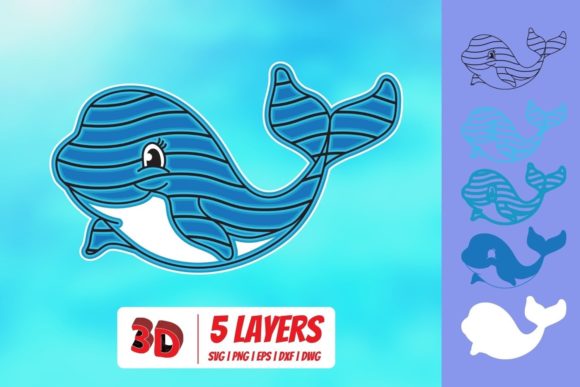
When integrating digital assets into physical crafting workflows, the distinction between a simple graphic and a functional design file is critical. The 3D Whale SVG represents a specific category of vector-based artwork designed to simulate depth and dimensionality without relying on rasterized shadows or complex mesh structures. For crafters utilizing cutting machines, this asset offers a unique balance of aesthetic appeal and technical precision. Understanding its capabilities requires an examination of the file formats included, the software ecosystems they support, and how it compares to standard two-dimensional silhouettes.
Understanding the Format Ecosystem
The value of the 3D Whale SVG lies not just in the visual design but in the versatility of the downloadable package. Typically distributed as a zipped folder, this resource includes multiple file extensions, each serving a distinct purpose within different software environments. This multi-format approach ensures that users with varying levels of technical expertise or budget constraints can utilize the design effectively.
- SVG (Scalable Vector Graphics): This is the primary format for most modern cutting machines. It allows for infinite scaling without pixelation, ensuring clean cuts regardless of the final project size. The 3D Whale SVG in this format is optimized for direct import into computer-aided design (CAD) platforms used by hobbyists.
- DXF (Drawing Exchange Format): A legacy vector format that remains essential for compatibility with entry-level software. It strips away some of the layering complexities found in SVGs, providing a simpler path for basic cutting operations.
- PNG (Portable Network Graphics): Included at 300 DPI with a transparent background, this raster image serves as a reference guide. It is useful for printing templates, creating mockups, or viewing the design in programs that do not support vector editing.
- EPS (Encapsulated PostScript): Ideal for professional graphic design workflows, this format preserves complex paths and is widely supported by desktop publishing applications.
Software Compatibility and Workflow Integration
Selecting the right software is often the first hurdle in digital crafting. The 3D Whale SVG is engineered to bridge the gap between consumer-grade cutters and professional design suites. Its compatibility extends across several major platforms, each catering to different user needs.
Advanced Design Software
For users engaged in intricate projects, the SVG version integrates seamlessly with Cricut Design Space, Silhouette Designer Edition, Make the Cut MTC, Sure Cuts A Lot (SCAL), and Brother’s Scan and Cut “Canvas”. These programs offer robust tools for manipulating layers, adjusting line weights, and preparing files for multi-material cuts. The 3D Whale SVG retains its structural integrity in these environments, allowing users to separate the "shadow" elements from the main body if they wish to create a layered effect using different colored materials.
This flexibility is particularly valuable when creating wall art or dimensional signage. Users can assign different colors to the overlapping shapes that create the illusion of depth, resulting in a more dynamic final product than a single-color silhouette would allow.
Entry-Level and Basic Software
Not all users have access to premium software licenses. The inclusion of the DXF format addresses this limitation. The 3D Whale SVG DXF variant is specifically formatted for use with Silhouette Basic Edition and other free or low-cost cutting software. While these programs may lack advanced layering features, the DXF file provides a reliable, cut-ready outline. This ensures that beginners are not excluded from using high-quality designs simply due to software restrictions.
Professional Graphic Design Tools
Designers who prefer industry-standard tools will find the EPS version of the 3D Whale SVG compatible with CorelDraw, Inkscape, and Adobe Illustrator. In these environments, the file acts as a base template. Professionals can refine the curves, adjust the bezier handles for smoother transitions, or integrate the whale motif into larger branding projects. The 300 DPI PNG also serves as a quick preview asset within these applications, helping designers visualize the placement before committing to vector tracing.
Comparing 3D Effects to Traditional Silhouettes
When evaluating the 3D Whale SVG, it is helpful to compare it against traditional flat whale silhouettes. The primary difference lies in the visual narrative and the complexity of the cut.
A traditional silhouette relies on negative space and a single continuous outline. It is efficient, requiring fewer material cuts and less setup time. However, it often lacks visual interest when viewed up close. The 3D Whale SVG, by contrast, uses overlapping shapes to suggest volume. This creates a sense of movement and texture that mimics the organic form of the animal.
Tradeoffs in Complexity
The enhanced visual appeal of the 3D Whale SVG comes with increased complexity. Users must consider the following factors:
- Material Waste: Creating a 3D effect often involves cutting out internal shapes or smaller overlapping pieces. This can lead to slightly higher material usage compared to a solid block cut.
- Assembly Time: If the design is intended to be layered (e.g., using vinyl or cardstock), additional time is required to align and adhere the layers correctly. Misalignment can disrupt the 3D illusion.
- Cutting Precision: Intricate details require sharper blades and proper machine calibration. Soft materials like felt or thin paper may tear if the blade pressure is too high, while hard materials like chipboard may require multiple passes.
Best-Fit Situations and Use Cases
Determining whether the 3D Whale SVG is the right choice depends on the end goal of the project. It is not merely a decorative icon but a versatile element suitable for various applications.
Home Decor and Wall Art
The most common application for this asset is large-scale wall decor. When printed on wood, MDF, or heavy cardstock, the layered 3D effect adds significant visual weight to a room. It works well in nurseries, ocean-themed bathrooms, or coastal living spaces. The ability to use multiple colors enhances its adaptability, allowing it to match specific interior color palettes.
Apparel and Accessories
For those working with heat transfer vinyl (HTV) or fabric, the 3D Whale SVG offers a sophisticated alternative to standard logos. By using contrasting colors for the shadow and main body, t-shirts, tote bags, and hats gain a textured look that stands out. The transparency of the PNG version aids in positioning the design accurately on garments before cutting.
Educational and Printables
Teachers and parents may use the 300 DPI PNG for educational activities. The clear, detailed representation of the whale’s anatomy makes it suitable for coloring pages, science projects, or puzzle-making. The vector versions allow for resizing these printables to any scale without loss of quality.
When to Choose Alternatives
While the 3D Whale SVG is a robust option, it may not be the ideal choice for every scenario. Consider the following situations where alternatives might be preferable:
- Speed-Critical Production: If you are producing hundreds of units for a market stall and need to minimize setup time, a simple single-cut silhouette is faster and less prone to error.
- Minimalist Aesthetic: Some design trends favor extreme minimalism. In such cases, the added complexity of the 3D shading may clash with the desired clean, uncluttered look.
- Limited Software Access: If you are using very basic software that cannot handle complex layering or grouping, the full potential of the 3D Whale SVG may be lost, making a flat SVG a more practical choice.
Conclusion on Suitability
The decision to use the 3D Whale SVG hinges on the balance between visual impact and production efficiency. Its strength lies in its adaptability across software platforms and its ability to elevate simple crafts into polished, dimensional art. By understanding the nuances of the included formats—SVG for advanced manipulation, DXF for basic cutting, and PNG for visualization—users can maximize the utility of the download.
For crafters willing to invest a modest amount of extra time in alignment and layering, the result is a superior aesthetic outcome that distinguishes their work from mass-produced items. Whether used for personal home decor or small business ventures, the 3D Whale SVG provides a reliable, high-quality foundation for creative expression. As with any digital asset, reviewing the file structure in your chosen software before cutting is recommended to ensure optimal results.